Practice the rules (beta)
Before running a system you do not know well, you can practice applying it. The AI draws situations from your scenes: a player attempts something, an opponent acts. You make the call from memory, then read the passage of your rules that applies.
Practice needs an AI provider and a game system linked to the campaign, with rules.
Start a series
Open practice with Practice the rules:
- on the campaign home, next to Guided method;
- on an adventure's page: its scenes are then already ticked.
You are offered two choices.
Scenes used as the setting. Tick up to eight scenes. Situations take place there, with their locations, characters and opponents. With no scene ticked, situations are general.
Rules to practice. Sections are ticked to match the chosen scenes: an encounter ticks combat and creatures, a location ticks exploration. You can tick or untick whatever you want; Back to the suggested sections undoes your changes. Each section carries a label: never practiced, to review, or how many times you have seen it.
Only rules written in the interface language are offered. In English, a section whose text is in French is hidden, even if it sits in the English tab of the rules; in French, it is the other way round. The screen tells you how many sections are hidden, and Show as well lets you tick them anyway. Quoted passages follow the same rule: a quote written in the other language is discarded. Rules that exist in one language only are offered in full.
Then click Prepare a series. The AI writes five situations and their answers in one go: allow from 30 seconds to a few minutes depending on the model. There is no more waiting afterwards.
Make the call, then read the answer
For each situation:
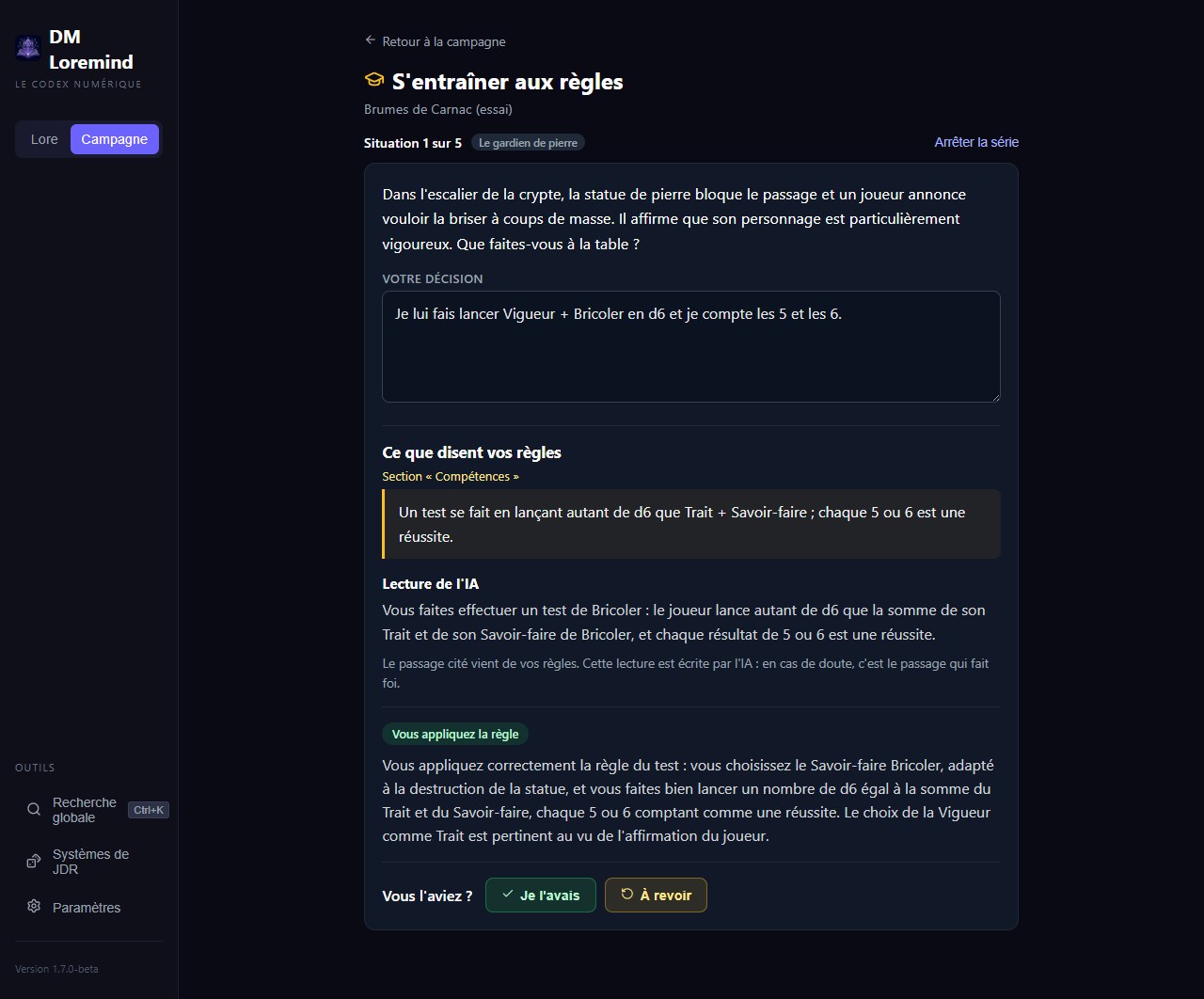
- Write what you would do in Your call: which roll, which rule, what consequences. You can also think it through without writing anything.
- Click Show the answer.
- Read What your rules say: the quoted passage and its section. The AI's reading then explains how to apply it to the situation.
- Rate yourself: I had it or To review. The next situation appears.
Compare my answer is optional. The AI then reads your call and says whether you apply the rule, partly, or not at all, and what is missing. It is one more AI call, lasting a few dozen seconds.
The application checks every quote: a situation whose passage is not found word for word in your rules is discarded before display. The AI's reading, however, remains an interpretation: when in doubt, the passage prevails.
Summary and progress
The Series summary lists the sections rated To review. Open the rules shows them in a new tab, and New series starts another one.
In the next series, sections to review are read first, then those never practiced. A section keeps the to review label until a series in which you get all of its situations right.
Progress is kept in your browser, per game system. It is not saved in the campaign: another device, such as a tablet, has its own.
Limits to know
- A series reads a limited amount of rules, about six pages. If you tick many sections, the last ones wait for the next series, and a very long section is covered piece by piece from one series to the next.
- The AI does not roll dice. The answer says which roll or procedure applies; it sometimes does a small calculation, to be checked like the rest.
- A section's language is recognised from its common words. A very short section, or a table of numbers, is not classified: it stays offered in both languages.
- Nothing is saved in the campaign: neither the situations nor your answers.
- Quality depends on the model and on how precise the rules are. Rules imported from a PDF and proofread give better situations.