Writing mentor
The complete mentor is available on beta from the 1.1.0-beta milestone, after stable 1.0.3. If lightbulbs are missing, check that your installed version includes these additions.
The mentor provides built-in advice while writing arcs, chapters and scenes. Lightbulb tips work without AI or calls to an external provider.
Open a tip
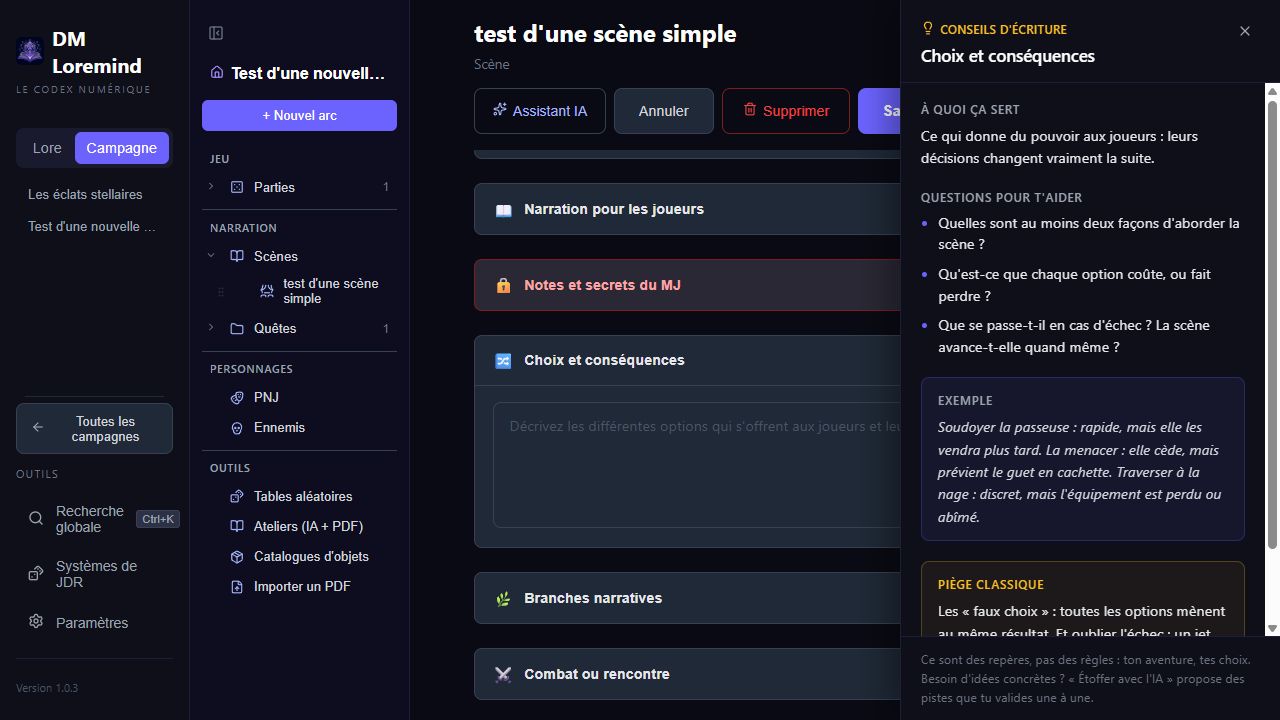
In an arc, chapter or scene editor, click the lightbulb beside a field label or section title. The panel contains:
- the field's purpose in preparation;
- questions to get started;
- a concrete example;
- a common pitfall.
Click another lightbulb to change the topic, or the close button to dismiss the panel. Clicking the current topic's lightbulb again also closes it.
Covered topics
| Sheet | Advice |
|---|---|
| Arc | Synopsis, themes, stakes, rewards and resolution; hidden truth and hooks from 1.4.0-beta |
| Chapter | Synopsis, player objectives and narrative stakes |
| Scene | Description, node type, place and time, atmosphere, narration, secrets, choices, branches and combat; purpose, tactics and morale from 1.4.0-beta |
| NPC (1.4.0-beta) | Role, motivation, knowledge and distinctive trait |
| Publishing (recent beta) | Presentation, warnings, hidden background, hooks, credits and licence |
Optional sections remain collapsible. An indicator on their header shows when they already contain content.
Branch guidance also covers varied clues, alternative paths and proactive events. The publishing sheet has its own lightbulbs for preparing a module for another GM.
From 1.4.0-beta, eight new tips support story fields for arcs and scenes and NPCs. They help you write a hidden truth, several hooks, a scene's purpose and opponents with goals.
Use it during preparation
For “Choices and consequences”, start with two possible approaches, their costs and what happens on failure. Write your answers in the field. The mentor does not fill the form or score your writing.
Guided preparation detects structural gaps; the mentor helps you write; the AI assistant suggests content on request. Each aid can be used independently.
Three ways to use the mentor
- Field tips: the lightbulbs described above help while entering content.
- Editor review: the campaign home and editors highlight choices, stakes, pacing and narration worth revisiting.
- Guided methods: choose Five-room dungeon, Node-based investigation or The villain's plan to build a chapter and its scenes from your answers.
All three work without AI. They complement Flesh out with AI, which needs a configured provider and suggests text on request.