Embeddings and document retrieval
The AI Workshop splits PDFs into indexed passages. An embedding model represents text meaning to retrieve passages related to your question. The chat model then uses those passages to write its answer.
These models are configured separately. Cloud chat can use local Ollama embeddings, or the other way around.
Configure embeddings
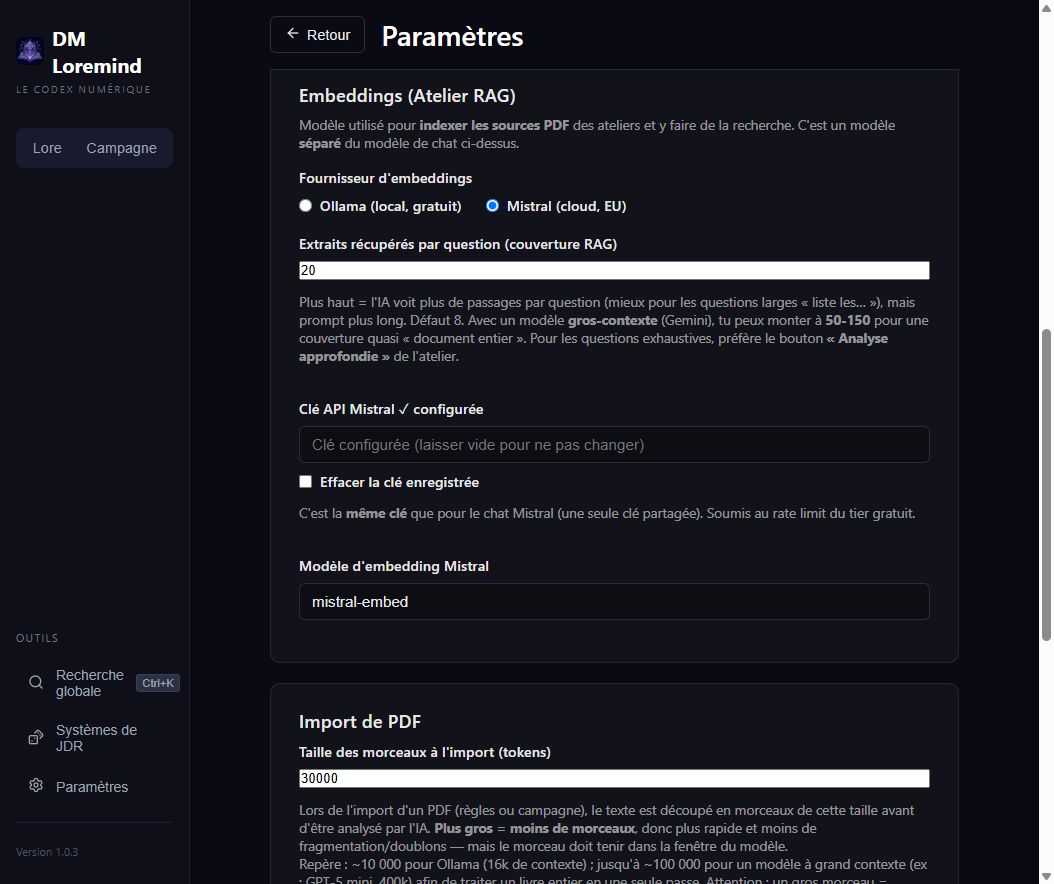
Under Settings → Embeddings (RAG Workshop):
- Choose Ollama or Mistral.
- For Ollama, check service access and choose an embedding model (default:
nomic-embed-text). Automatic model download can be enabled. - For Mistral, configure the Mistral API key and embedding model (default:
mistral-embed). The key is shared with Mistral chat settings. - Adjust the number of passages retrieved per question if needed.
- Click Save, add a PDF to a workshop and wait for Ready status.
An Ollama conversation model cannot replace an embedding model. Both are required for a fully local Workshop workflow.
Adjust coverage
The passage count, or top-K, defaults to 8 in the service configuration. Increasing it supplies more text to chat, but makes the context longer and may slow down responses.
Start with the default for a focused question. For an exhaustive list, select the appropriate sources and use the Workshop's deep analysis, which scans their text rather than only retrieving the closest passages.
PDF import chunk size and AI timeout control rules or campaign analysis. They are not the number of passages retrieved for a RAG question.
After changing models
An index depends on the model that produced it. After changing embedding providers or models, reindex with the new model. If your version has no reindex command, add the PDFs to a new workshop. Keep source files and the old workshop until you have checked the new answers.
Where does the text go?
With Mistral embeddings, passages being indexed are sent to its API. With cloud chat, retrieved passages are sent to the chat provider too, even when embeddings are local. Use Ollama for both functions to keep that processing on your machine. See Data and sharing.